Showing posts with label email. Show all posts

Tuesday, June 23, 2015

How To Write A Professional Email

Email can be an effective tool in business. It allows for efficient communication with customers, co-workers and colleagues in your industry as it does not require both the sender and receiver to be available simultaneously. However, email is often considered informal which can present some difficulty when trying to compose a professional message.
Before drafting an email it's important to consider the following:
  • Do you know the recipient? If you do, are you asking for a favor? Or an introduction?  
  • If it’s a new professional acquaintance, reference where you met and/or a mutual connection to establish rapport. If it’s an intro you seek, include a snapshot of your company and your responsibilities or communicate via a social site with an internal email [InMail] program like LinkedIn to streamline the pursuit.
  • Making a pitch? If yes, get to know your audience. Being familiar with more than just the recipient’s job title is essential for a well-crafted email pitch. Just ask HubSpot.


Often, things like tone can get lost in translation in an email. Approaching your message with the following tips in mind can help avoid miscommunication:
  1. Create an eye-catching subject line. It should be succinct and to the point.
  2. Time is money. Be brief! You don't want to lose the recipient the moment they open your message. Assume your recipient has a high volume of emails. In the interest of time, they may skim your message, resulting in missed details.
  3. Address the person directly and be personable. For example: "Hi Jenn, I hope all is well!" or "Good morning, Jenn!" both address the recipient and exude a tone that will be well received.
  4. Speaking of tone. Be sensitive. Are you offering criticism or feedback? Perhaps it would be best addressed in person. Are you worried your email is so concise that it's reading as rude? Close your email with a positive comment or sincere compliment to offset any misconstrued sharpness.
  5. Don't include anything you wouldn't want to see as a headline. In today's world, anything you write is just one click away from the wrong hands. Keep this in mind before hitting "send."
  6. Watch out for grammar and spelling mistakes. Using shorthand in an email is one thing, but making a grammatical or spelling error can hurt the recipient's interpretation of the message and perception of you as a professional. Proofread your message and then proofread it, again.
  7. Be wary of elaborate signatures. When signing off in an email keep things simple. Relying on a corporate logo can be dangerous as they do not always load correctly. Test your signature before you send your message or stick to the basics: your name, title, business and phone number.


Send your next email as an Accredited Business! Learn more about being part of a community of trustworthy businesses.


For more information you can trust, visit us at bbb.org/boston, like us on Facebook, or follow us on Twitter and LinkedIn.

Thursday, April 24, 2014

AOL Confirms Mail Service Has Been Spoofed

Do you have an AOL email address for your business? If so, check your sent messages!

AOL Mail is being spoofed and users’ AOL email accounts are apparently sending messages that contain a link in them which could lead to malware, viruses or phishing attacks, according to USA Today. It is currently unknown how widespread the issue is. AOL has assured its users that they are taking the necessary safety and security measures to resolve the issue and are working to have users’ accounts running smoothly and securely.

AOL is recommending that users check the email in their Sent folder to see if there has been mail sent unknowingly. Regardless of the findings, users should change their passwords and report any questions to the official AOL Mail Help Twitter page, which AOL has been using to respond to users’ tweets during business hours.

AOL has issued this statement in regards to the ongoing efforts they plan to take against the email spoofing.

Note: AOL, Inc. is a BBB National Partner. 

Saturday, July 27, 2013

Dun & Bradstreet Reports Phishing Email Scam

Did you receive a customer complaint email from Dun & Bradstreet recently? It may be a phishing scam. According to a recent release on the D&B website, a spammer sent out a large number of emails purporting to come from D&B (alert@dnb.com) alleging that a complaint requiring prompt action had been made against the recipient. Like many phishing scams, the email looks real. In this case, the scammer used the Dun & Bradstreet Credibility Corp. logo and even the correct contact information.

Dun & Bradstreet, is working hard to identify the spammer and recommends contacting D&B (866-584-0283) if you ever doubt the origin or content of a D&B email.

For any email that you suspect may be a phishing scam:

  • Do NOT click on any links or attachments.
  • Read the email carefully for signs that it may be fake (for example, misspellings, grammar, generic greetings such as “Dear member” instead of a name, etc.).
  • Be wary of any urgent instructions to take specified action such as “Click on the link or your account will be closed.”
  • Hover your mouse over links without clicking to see if the address is truly from the sender. The URL in the text should match the URL that your mouse detects. If the two do not match, it is most likely a scam.
  • Delete the email from your computer completely (be sure to empty your “trash can” or “recycling bin,” as well).
  • Run anti-virus software updates frequently and do a full system scan.
  • Keep a close eye on your bank statements for any unexpected or unexplained transactions.
Read the full alert, here


Thursday, June 6, 2013

Fake Scanner Emails Infect Office Computers

You are at work, and you receive a message from what you think is your office printer/scanner. It appears that someone sent you a copy of a scanned document.  The name doesn't ring a bell, but you open the attachment anyway.

When you click on the file, you find that it isn't a scanned copy of the latest office report. It’s really a link to a third-party website that will download a virus to your computer.  These viruses phish for personal and banking information on your machine. 

The settings in the email header have been faked, so the messages appear to come from an internal email address. However, with so many workplaces failing to set strong passwords, it is possible that your scanner was hacked.

As always, variations of the scam exist. Most recently, scammers have disguised malware as emails from Hewlett-Packer and Xerox scanners. But scammers will hijack any famous manufacturer’s name to lend credibility to their scam.

NOTE: Hewlett-Packard, IBM and Microsoft are BBB Accredited Businesses. Hewlett-Packard is also a BBB National Partner.

How Do I Protect My Work Computer From Viruses: 

While your work computer is not your personal property, downloading a virus is great way to ruin your work day. Here are tips for protecting your office computer:

  • Create strong passwords. Don’t leave the factory presets or use easy to crack passwords. See Microsoft’s tips for creating strong passwords.
  • Don’t believe what you see. Scammers can make emails appear to come from an account at your office. Just because it’s an “@yourbusiness.com” address does not mean it’s safe.
  • Be wary of unexpected emails that contain links or attachments. Do not click on the links or open the files.
  • Beware of pop-ups. Some pop-ups are designed to look like they’ve originated from your computer. If you see a pop-up that looks like an anti-virus software but warns of a problem that needs to be fixed with an extreme level of urgency, it may be a scam.
  • Keep anti-spyware, anti-virus and anti-spam software up to date.  Your office’s IT department probably has your computer programmed to conduct regular scans and updates. Let these run as planned.

Have you received an email like this?

Tuesday, April 23, 2013

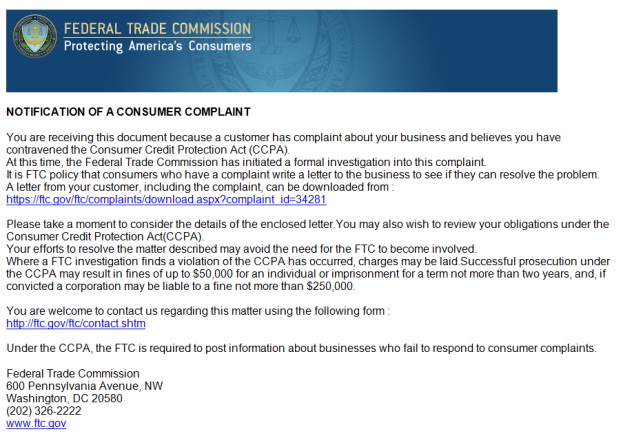
How Fake FTC Emails are Tricking Business Owners


A new phishing scam is making the rounds disguised as a consumer complaint notification from the FTC. If you receive it, just hit "delete."  

How the Scam Works:

You get an email that appears to be from the FTC with the subject line: "Notification of a Consumer Complaint." (Sample email below) The email states that a complaint has been filed against your business, and you need to review and respond to the allegations. 

The email provides a link for you to supposedly click through to the FTC website and download a PDF of the complaint details. The link really goes to a third party website, and the file you download is actually malware that scans your computer for personal and banking information.

Like most scams, this one is not set in stone. Several variations already exist, and scammers will continue to alter the emails as news of the con spreads. Watch out for changes in the subject line and the complaint details. Older reports of the scam involve emails that urge recipients to call a fake FTC help hotline or complete an online complaint form.  

How to Spot a Phishing Email:  
  • Don't believe what you see. Scammers can make links look like they lead to legitimate websites (as in the example above) and emails appear to come from a different sender. It's also easy to steal the colors, logos and email header of the FTC or any other established organization.
  • Be wary of unexpected emails that contain links or attachments.Do not click on the links or open the files.
  • Check a link's true destination by hovering over it and looking in the lower right hand corner of your browser.
  • Try Googling the organization or the contents of the email. If the email is a scam, this is likely to reveal an alert or bring you to the organization's real website, where they may have posted further information.
For More Information  
Check out the Federal Trade Commission's official warning about the scam.
 
To find out more about scams, check out BBB Scam Stopper.


Thursday, January 31, 2013

New Twist on the BBB Phishing Email Scam... Again!


BBB has been the victim of a phishing scam for over a year. Scammers have just launched a campaign involving supposed BBB complaints. The emails carry an attached “complaint form” that is actually a virus! Many were emailed yesterday and demand a response by January 23rd. The emails purport to come from the Chicago BBB.

If you have received this, or any other suspicious emails from someone claiming to be from the BBB, please forward them to phishing@council.bbb.org to help us shut down the scammers as quickly as possible. Do not click on any links or download attachments.

For more on the BBB phishing scam, go to bbb.org.

Tuesday, January 15, 2013

Beware of the BBB Phishing Email

The BBB reports another scam using the BBB name has popped up again, and has been received by consumers and businesses from our own BBB office including other areas across the U.S. and Canada. They are really good fakes – they use correct grammar and follow formats often used by BBB, so they look quite realistic. Businesses and consumers are advised not to click!

Two versions of the email have been received. One claims to be following up on a complaint filed with BBB, the other is asking for updated contact information “as a service to BBB Accredited Businesses.”

Both refer the recipient to an online form, and the address appears to be that of a local BBB. However, if you hover your mouse over the web address (the part that begins with http), you can see that the real address is not from BBB at all. DO NOT CLICK ON THE LINK! The link actually takes you to a rogue website that downloads a Trojan virus on your computer.

The bottom line is this: If you don’t own a business, you can disregard any BBB email that claims your company has been the subject of a customer communication. If you do own a business, you can always check with your local office to confirm the legitimacy of any email purporting to come from BBB.

Wednesday, December 5, 2012

Another BBB Phishing Scam. Don’t Bite!

Phishing scams look like legitimate email, and they are getting more sophisticated every day. What these con artists are really after is your banking and financial information. And they won’t mind destroying your computer to get it.

Once again, scammers are sending emails that appear to come from your trusted Better Business Bureau. They’ll tell you that a complaint has been registered against your business, or that a customer has submitted a review of your business. (It doesn’t matter that you might not even OWN a business.)

The email will ask you to download and complete an attached form, or it will ask you to click on a link to view and respond to the consumer posting. Don’t do either!

The “attached form” is actually an executable file that will drop a nasty virus onto your system. Next thing you know, you’ll see a pop-up message that claims your computer is infected with dozens of viruses, and that will offer to clean your system for a fee. If you provide your credit card or banking information to have your system cleaned, you will waste your money, and the scammers will then have access to your funds and will steal even more of your money.

The links in the bogus email are dangerous, as well. They look like a link to a BBB page, but the code behind the link will actually route your browser to a website where malware is dropped onto your computer. The malware is written in such a way that it usually passes by anti-virus programs undetected. Once the malware is in place, the scammer can sniff for your banking information (including user names and passwords), and can use your system to send more scam emails out to your contacts under your name.

The bottom line is this: If you don’t own a business, you can disregard any BBB email that claims your company has been the subject of a customer communication. If you do own a business, you can always check with your local office to confirm the legitimacy of any email purporting to come from BBB. To find your local office, visit www.bbb.org/find. But never click on a link in an email or download an attachment unless and until you confirm that it truly came from BBB.

BBB would like you to send us any bogus emails claiming to come from BBB. Forward the email(s) to phishing@council.bbb.org. Don’t worry if you receive a notification that the email could not be delivered because of an attached virus. We pull them from quarantine and examine them anyway. Please understand that we would like to reply to each email, however, when the traffic to the phishing mailbox is particularly heavy, we might not be able to offer a direct reply. If you need personal assistance with an email, contact your local BBB.